Reseller Spreadsheet
One-tab inventory and profit tracker
£13.00at launch
Visit our Etsy shopComing to Etsy soon. The price above is the planned launch price.
- Digital download: nothing is posted to you
- Files ready as soon as you buy
- Secure checkout on Etsy
- One row per item, from the day you buy it to the day it sells.
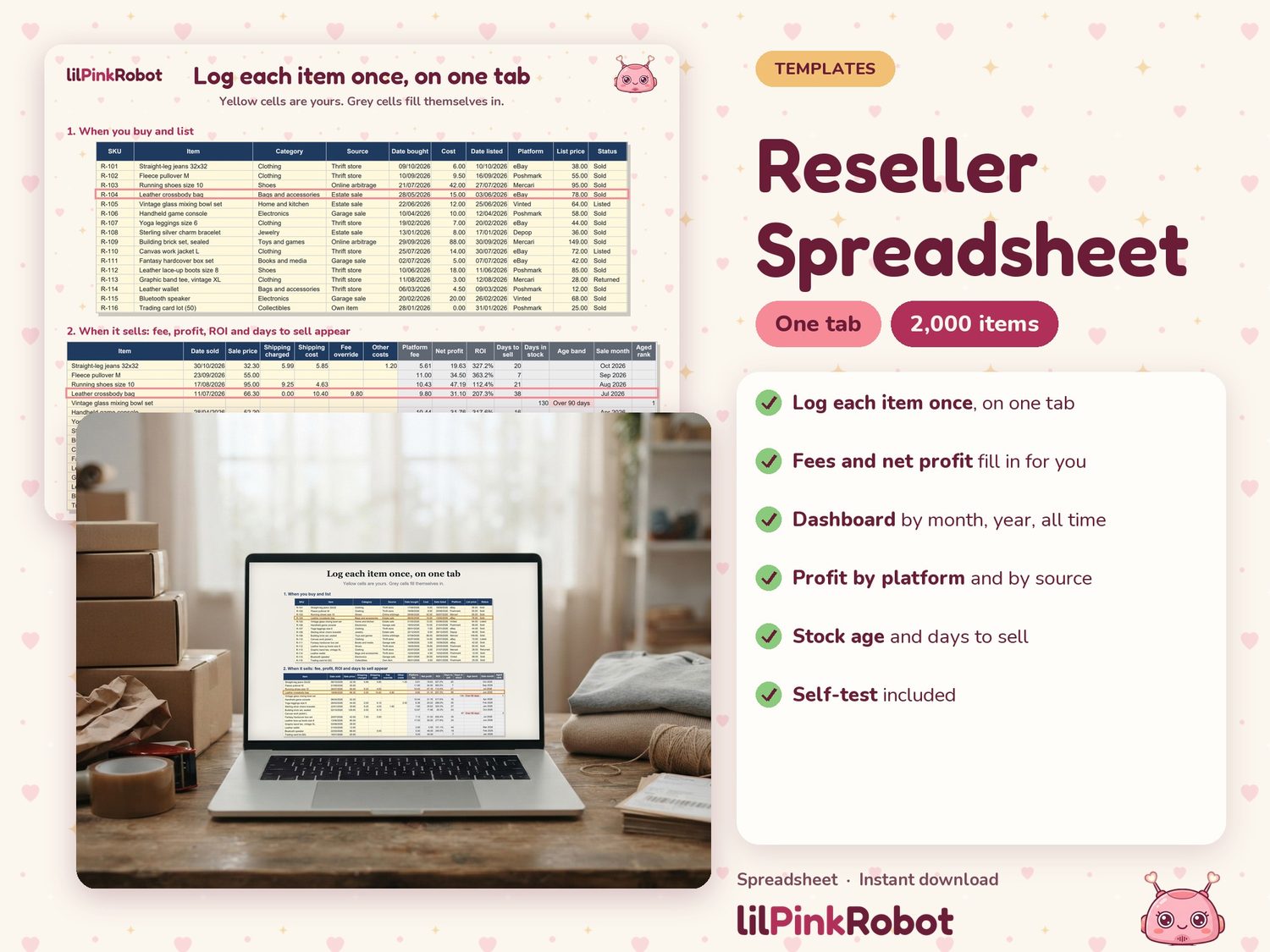
- Change Status to Sold, enter the sale price and shipping, and the platform fee and net profit appear.
- Net profit = sale price + shipping charged - shipping cost - platform fee - other costs - cost.
- Yellow cells are yours to type in. Grey cells calculate themselves and are locked (no password), so formulas are not overwritten by accident.
The details
A reselling ledger where you log each item once, on one tab. Fees, net profit, ROI, days to sell, stock age, the monthly summary and the year-end totals fill themselves in from that one row. There are no separate inventory and sales tabs to keep in sync.
How it works
- One row per item, from the day you buy it to the day it sells.
- Change Status to Sold, enter the sale price and shipping, and the platform fee and net profit appear.
- Net profit = sale price + shipping charged - shipping cost - platform fee - other costs - cost.
- Yellow cells are yours to type in. Grey cells calculate themselves and are locked (no password), so formulas are not overwritten by accident.
- Room for 2,000 items. Empty rows stay blank.
What is inside the workbook
- Items: the only tab you type in, with dropdowns for category, source, platform and status.
- Dashboard: revenue, cost of goods sold, fees, shipping, net profit, items sold, average days to sell and sell-through rate for this month, year to date and all time. Profit by platform and by source. Value of unsold stock at cost. Two charts.
- Monthly: twelve months for the year you choose.
- Aged Stock: unsold items by age band (0-30, 31-60, 61-90, over 90 days) and a list of everything unsold for more than 60 days, oldest first.
- Tax Summary: gross sales, shipping income, cost of goods sold, platform fees, shipping costs, other costs and net profit for your tax year. You choose the month your tax year starts.
- Settings: fee rates per platform, your own categories and sources, currency symbol.
- Self-Test: five PASS or FAIL checks that the totals agree with your rows.
About the fee presets
- Each platform has four editable numbers: percent, fixed fee per order, a threshold, and a flat fee under the threshold.
- Preset rates are filled in for eBay, Poshmark, Vinted and Mercari (US). Each was read from the platform's own page on 8 October 2026, and the page is noted beside it.
- Depop has no preset rate: its rate could not be confirmed from Depop's own fee page, so that row says "Enter your current rate".
- The presets are starting points. Fees change and differ by category, country and seller level. Please confirm your own rates. A Fee override column lets you type the real fee for any single sale.
What you get
- Reseller-Ledger.xlsx (the workbook)
- Reseller-Ledger-Google-Sheets.pdf (copy link and three setup steps)
- Quick-Start.pdf (one page: enter an item, mark it sold, read the dashboard)
Good to know
- Opened in Excel for the web (October 2026) with the same test items: same figures, all five Self-Test checks read PASS.
- One currency per workbook. The currency symbol appears in headings; amounts are plain numbers.
- Not included: marketplace imports, multi-currency, mileage log.
- The Tax Summary is a summary of the figures you enter, for you or your tax preparer. It is not tax advice.
- This listing is not affiliated with or endorsed by eBay, Poshmark, Vinted, Mercari or Depop.
- Because this is a digital file, it cannot be returned. Message me if anything does not open and I will help.